No sheet music. No pencil. No subscription.
Just pull out your phone, read notes, type them or drag them into the staff – on the train, on your break, wherever you want.
The free Note (Affiliate-Link)¹ Trainer on theorie-musik.de is an interactive online exercise for music students, conservatory students and anyone who wants to improve their note-reading skills. See a note in the staff, identify its name or value – and configure the training to match your level. That’s how easy online note training can be!
The exercise is suitable for both beginners and advanced music theory learners. With three practice modes (Read, Type, Write), a highscore system and fully configurable training, practising stays varied and motivating.
You see a note (Affiliate-Link)¹ in the staff, choose the correct answer, type the note name or drag a note to the right position – and get instant feedback. Done. No installation, no registration, no subscription – just get started.
What is Note Reading?
Note (Affiliate-Link)¹ reading is the ability to quickly and confidently identify notes in a staff – their name, octave and value. It is one of the most fundamental skills in music education. Those who read notes confidently play more fluently, learn new pieces faster and understand music theory more deeply.
Who is the Note Trainer for?
The Note (Affiliate-Link)¹ Trainer on theorie-musik.de is aimed at:
- 🎓 Music students – ideal for preparing for lessons or exams
- 📋 Grade exam participants – ideal for preparing for music theory grade exams
- 🎼 Conservatory students – note (Affiliate-Link)¹-reading skills for entrance exams and tests
- 🎵 Music A-level students – preparation for the music A-level
- 🎸 Hobby musicians – targeted improvement of note (Affiliate-Link)¹-reading in treble and bass clef
- 👩🏫 Music teachers – as a supplement in lessons
From absolute beginner to expert – if you only want to practise the natural notes in the treble clef, just set it up that way. If you want to master double accidentals in the bass clef with ledger lines, you can do that too. The training adapts to you – not the other way around.
How the Note Trainer Works
Before you start, configure your training once according to your preferences. Then it begins immediately – no registration, no subscription, no loading screen.
1. What do you want to practise?
Choose first what should be tested:
🎹
Pitch
Identify the name of the note (Affiliate-Link)¹ – natural note and accidental
⏱️
Note (Affiliate-Link)¹ Value
Identify the value of the note (Affiliate-Link)¹ – whole, half, quarter, eighth …
🔀
Mixed
Both together – the most challenging variant
2. How do you want to answer?
Choose one or more practice modes – the trainer then switches randomly between them:
👁️
Read
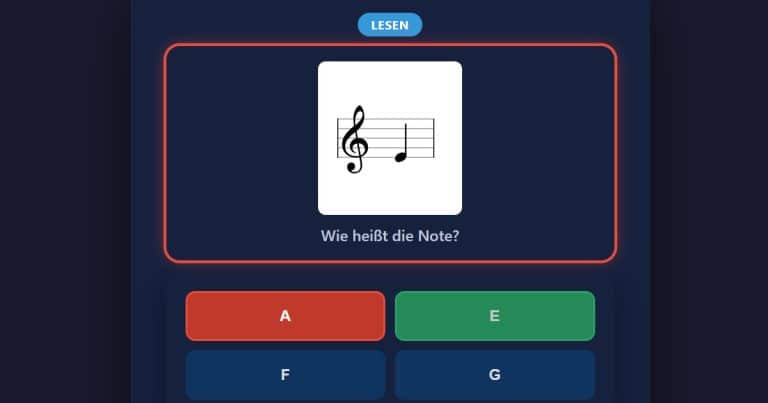
Four answer options – click the correct one
⌨️
Type
Type the note (Affiliate-Link)¹ name directly (e.g. “F#” or “Bb”)
✏️
Write
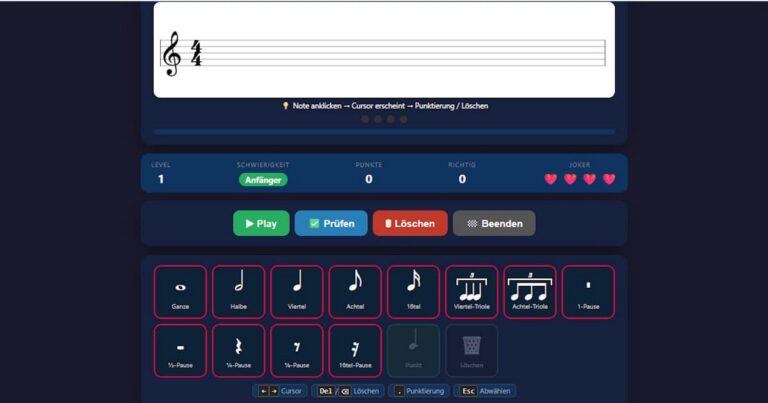
Drag the note (Affiliate-Link)¹ to the correct position in the staff – you need to know not only the pitch but also the correct octave
3. Further Settings
Clef
- Treble clef
- Bass clef
- Both (the trainer switches randomly)
Accidentals
- Natural notes only (no accidentals)
- Sharps
- Flats
- Double sharps and double flats
Ledger Lines
Control with a slider how many ledger lines may appear – from zero (main lines only) to several ledger lines above and below the staff.
Note (Affiliate-Link)¹ Values (only for Note Value & Mixed)
Choose exactly the values you want to practise:
Whole · Half · Quarter · Eighth · Sixteenth
The 3 Practice Modes in Detail
👁️ Read – Multiple Choice
You see a note (Affiliate-Link)¹ in the staff and choose the correct name or value from four answer options. Ideal for getting started and quickly training note recognition.
⌨️ Type – Text Input
You see a note (Affiliate-Link)¹ in the staff and type the note name directly – for example “F#” or “Bb”. This trains active recall rather than mere recognition. The trainer accepts common spellings and is tolerant of upper and lower case.
✏️ Write – Drag & Drop
You see a note (Affiliate-Link)¹ name and drag the note to the correct position in the staff. For notes with accidentals, you then select the appropriate accidental. This trains not just reading but also notating pitches – the most challenging mode!
How a Round Works
1. Configure your training
Set up what and how you want to practise before you start. The training begins immediately – no registration needed.
2. Identify or enter the note (Affiliate-Link)¹
- 👁️ Read: Click on the correct answer from the four options.
- ⌨️ Type: Type the note (Affiliate-Link)¹ name and click ✔ Check.
- ✏️ Write: Drag the note (Affiliate-Link)¹ to the correct position and confirm with ✔ Check.
In the Mixed mode (Pitch & Note (Affiliate-Link)¹ Value), the question is two-step: first you choose the note name, then the note value – both steps must be correct.
3. Get feedback
After each answer you immediately see whether you were right or wrong. A correct answer earns you points; a wrong answer costs you a life ❤️.
4. Next question
After each answer the ➡️ Next Question button appears – so you move on at your own pace.
5. End the game & Highscore
With ✕ End you finish the training and can enter yourself in the highscore list.
Points & Lives System
You start with 4 lives ❤️❤️❤️❤️. Each wrong answer costs one life. When all lives are used up, the Game Over screen appears with:
- Your final score
- An overview of your hit rate
- The option to enter yourself in the highscore list
- The 🔄 Play Again button
How are points calculated?
Points depend on the difficulty of your configuration and the practice mode:
- Write gives the most points
- Type gives more points than Read
- More accidentals, ledger lines and clefs = more points per correct answer
The more challenging your settings, the more there is to gain! 🏆
Note Trainer on Smartphone & Tablet
The Note (Affiliate-Link)¹ Trainer works fully on mobile devices. The drag & drop in Write mode is optimised for touch – simply drag the note to the correct position with your finger.
More Exercises on theorie-musik.de
Those who want to further improve their music theory knowledge will find more free exercises on theorie-musik.de, for example:
- Interval Trainer – read, hear and write intervals
- Rhythm Dictation – hear rhythms and enter them as notes
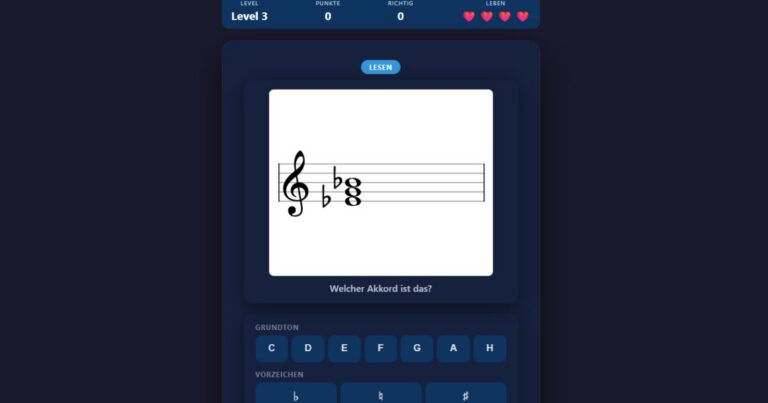
- Write Triads – major, minor, diminished and augmented
- Circle of Fifths – train keys and accidentals
Frequently Asked Questions (FAQ)
What is note (Affiliate-Link)¹ reading?
Note reading is the ability to quickly and confidently identify notes in a staff – their name, octave, accidentals and value. It is one of the most important basic skills in music education.
Who is the Note (Affiliate-Link)¹ Trainer for?
The exercise is suitable for music students, conservatory students, music teachers and anyone who wants to improve their note-reading skills – from beginner to expert.
Is the Note (Affiliate-Link)¹ Trainer free?
Yes! The Note Trainer on theorie-musik.de is completely free and usable without registration.
What is the difference between treble and bass clef?
In the treble clef, notes are in a higher range (typical for melody instruments like violin or flute). In the bass clef, notes are lower (typical for cello (Affiliate-Link)¹, double bass or the left hand on the piano).
What is the difference between Pitch, Note (Affiliate-Link)¹ Value and Mixed?
In “Pitch” mode you identify the name of the note. In “Note Value” mode you identify how long the note sounds (e.g. quarter or half). In “Mixed” mode you must identify both – the most challenging variant.
What is the difference between Read, Type and Write?
With Read you choose from four given answers. With Type you enter the note (Affiliate-Link)¹ name yourself. With Write you drag the note to the correct position in the staff – this is the most difficult mode.
Can I use the Note (Affiliate-Link)¹ Trainer on my phone?
Yes, the exercise is fully mobile-optimised and works on smartphones and tablets – including touch drag for Write mode.
What are ledger lines?
Ledger lines are short additional lines above and below the staff on which notes are written that lie outside the five main lines – for example middle C in the treble clef. The more ledger lines you allow, the more challenging the training becomes.
Free Online Exercises
Interactive carousel with 4 music theory exercises. Use the arrow keys or swipe to move between the exercises.
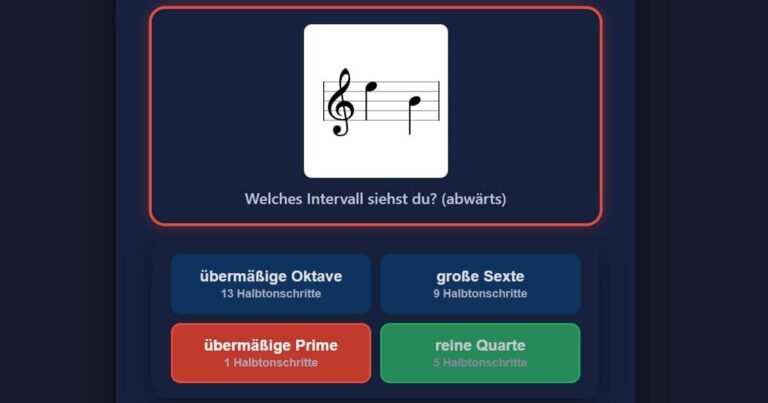
Interval Trainer
Practice identifying and notating intervals with confidence, from seconds to octaves.